A storefront your team can edit and your customers can finish
Headless commerce and content platforms built on Next.js. A modelled catalogue, a checkout that survives real payment edge cases, and an editing experience your marketing team can use without opening a ticket.
12+
Products shipped end to end
3+
Years building commerce and content
100%
Storefronts editable without a developer
Built on commerce tooling your team already trusts
Why storefronts underperform
The theme looked fine. The funnel is where the money leaks.
Most underperforming stores do not have a design problem. They have a content model that cannot express the catalogue, and a checkout that fails quietly on the cases that matter.
I model the catalogue and content properly first, build the storefront server-rendered and cached, and wire checkout with the failure states designed rather than discovered — then hand your team an editing experience that does not require a deploy.

The problems I get called in to fix:
- 01
Every content change needs a developer
A price, a banner, or a landing page becomes a ticket. Marketing stops shipping because shipping is somebody else's queue.
- 02
A content model that fights the catalogue
Variants, bundles, regional pricing, and made-to-order items get forced into a schema that never planned for them, so the workarounds become the system.
- 03
Checkout that fails silently
Declined cards, expired sessions, out-of-stock races, and tax edge cases end in a blank page. Nobody finds out except the customer who left.
- 04
Slow product and category pages
Unoptimised images, client-side rendering of everything, and no caching strategy. The score is fine on the homepage and terrible where people actually buy.
- 05
SEO that was never modelled
Duplicate URLs, missing canonicals, no product structured data, and a sitemap generated by hand. Organic traffic never arrives.
1
Content model before any theme
0
Deploys needed to edit content
100%
Product pages server-rendered
What commerce and content work covers
End to end storefront and content platform builds
Catalogue, content, checkout, and the operational surfaces behind them. Scoped to your business rather than to a theme's assumptions.
Content modelling & CMS setup
The schema comes before the screens: products, variants, collections, editorial pages, and reusable blocks, designed so an editor can compose a new landing page without asking for a code change. Roles, previews, and publishing workflow included.
- Sanity or headless CMS schema design
- Reusable content blocks for editors
- Draft previews and publishing workflow
- Editor roles and permissions
Commerce expertise
The layers a storefront is actually made of
Headless means you choose each layer. These are the ones I build on, picked for editor experience and long-term maintenance rather than novelty.
Where your team works every day. The editing experience matters more than the developer API.
What gets built
The surfaces that decide whether a store works
Every commerce build comes down to the same handful of screens. These are the ones I spend the most time on.

Product and category experiences
Category pages that stay fast with thousands of SKUs, and product pages where variants, stock, delivery estimates, and media all agree with each other. Server-rendered and cached, so the tenth filter click is as fast as the first.
- Cached, server-rendered listings
- Variant and option selection logic
- Live stock and delivery estimates
- Gallery, video, and zoom media
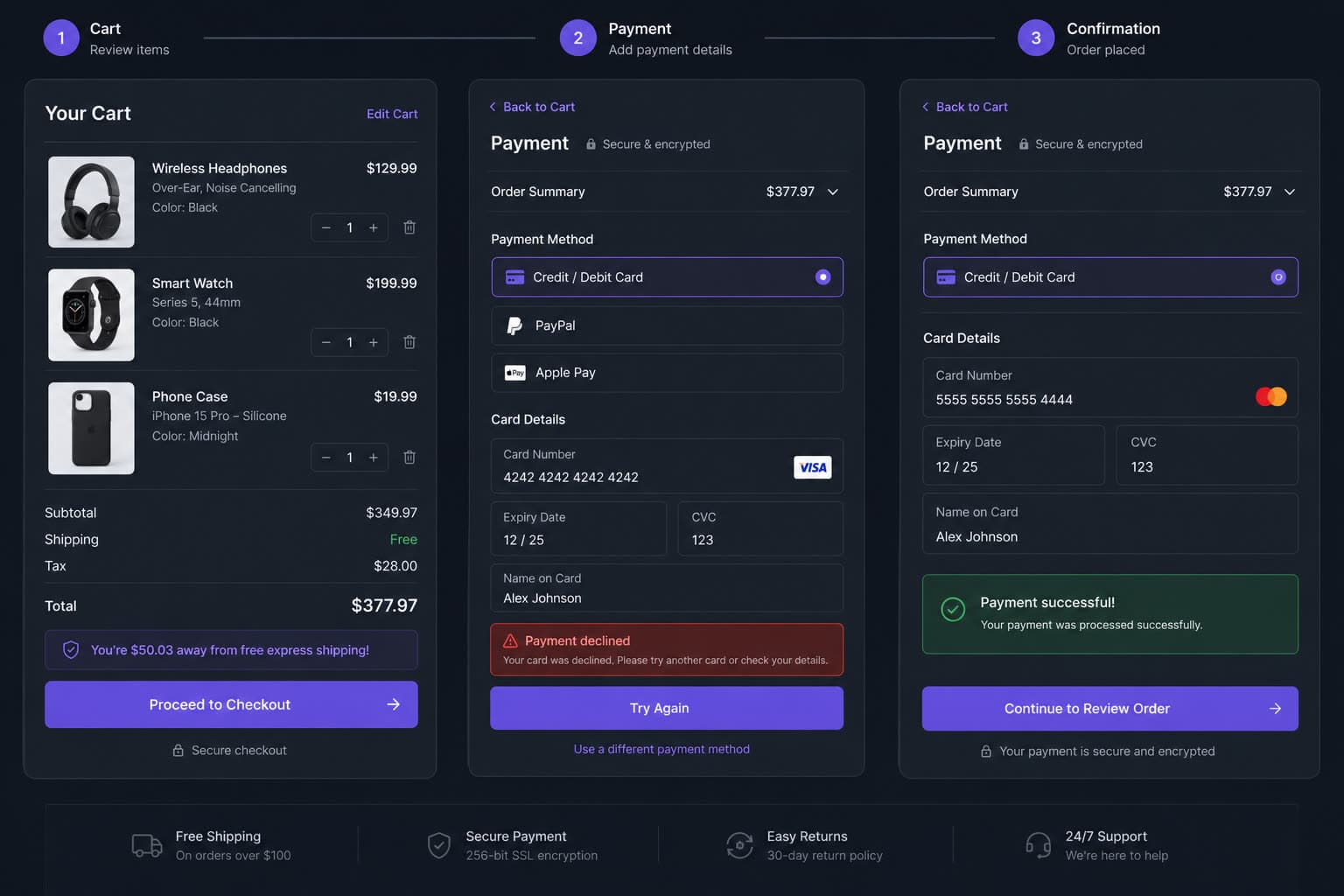
Cart, checkout and recovery
A checkout designed around failure: declined payments, expired sessions, stock changing mid-flow, address validation, and guest checkout — each with a screen that tells the customer what to do next instead of a blank page.
- Guest and account checkout paths
- Designed decline and retry states
- Address and tax validation
- Abandoned cart recovery flows
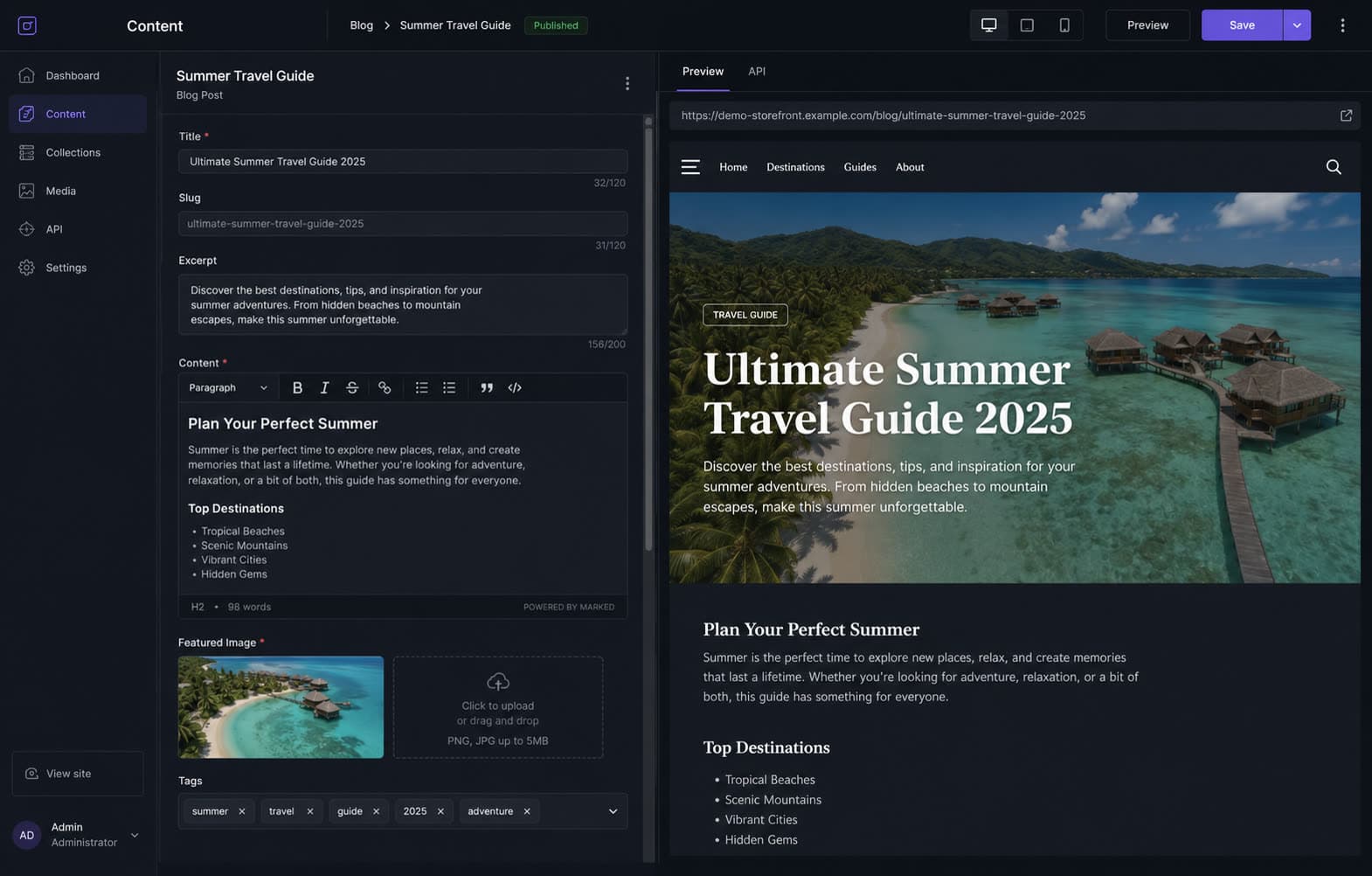
An editing experience marketing can use
Composable page blocks, live previews, scheduled publishing, and campaign landing pages an editor can assemble alone. The content team stops filing tickets and starts shipping.
- Composable block-based pages
- Live draft previews
- Scheduled and staged publishing
- Campaign and promo templates

Back-office and fulfilment surfaces
Orders, returns, warranty claims, and customer records surfaced where your operations team works, and synced with the ERP so finance and fulfilment see the same numbers.
- Order and fulfilment dashboards
- Returns and warranty workflows
- ERP and accounting sync
- Customer history and notes

Search, personalisation and merchandising
Search that tolerates typos, filters that reflect the catalogue, and merchandising rules that let your team promote a collection without a developer. Recommendations built from your own behaviour data.
- Typo-tolerant, faceted search
- Editor-controlled merchandising
- Related and recommended products
- Query log review and tuning
Replatforming, or fixing what you have?
Both are valid, and the wrong choice is expensive. Book a free 30-minute call and we will look at your current stack, your catalogue complexity, and your team's workflow, then tell you which one your situation actually calls for.
Real storefronts. Real catalogues.
Commerce and content work I have shipped
Storefronts, marketplaces, and the operational systems behind them. Problem, solution, and my role on every build.

Jewelry Vara E-Commerce
A jewelry brand needed a premium online storefront that presented products as hero imagery, with a catalog layout elegant enough to match the brand.

E-commerce Marketplace
A fashion retail client needed a modern, full-featured e-commerce marketplace with product catalog, shopping cart, and responsive design.
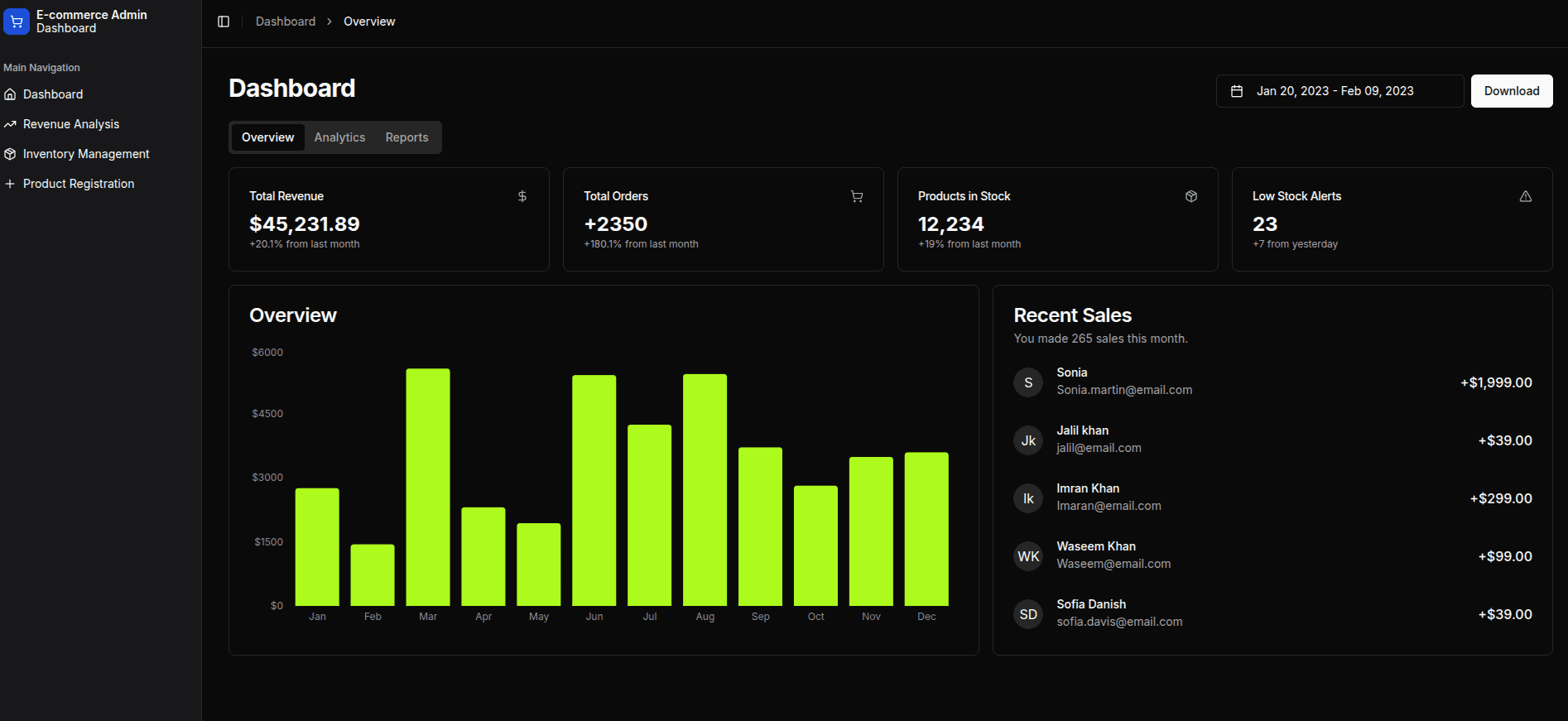
E-Commerce Storefront
An online store needed a fast, modern storefront with a complete shopping journey (browsing, cart, and checkout) plus a manageable way to handle incoming orders after launch.
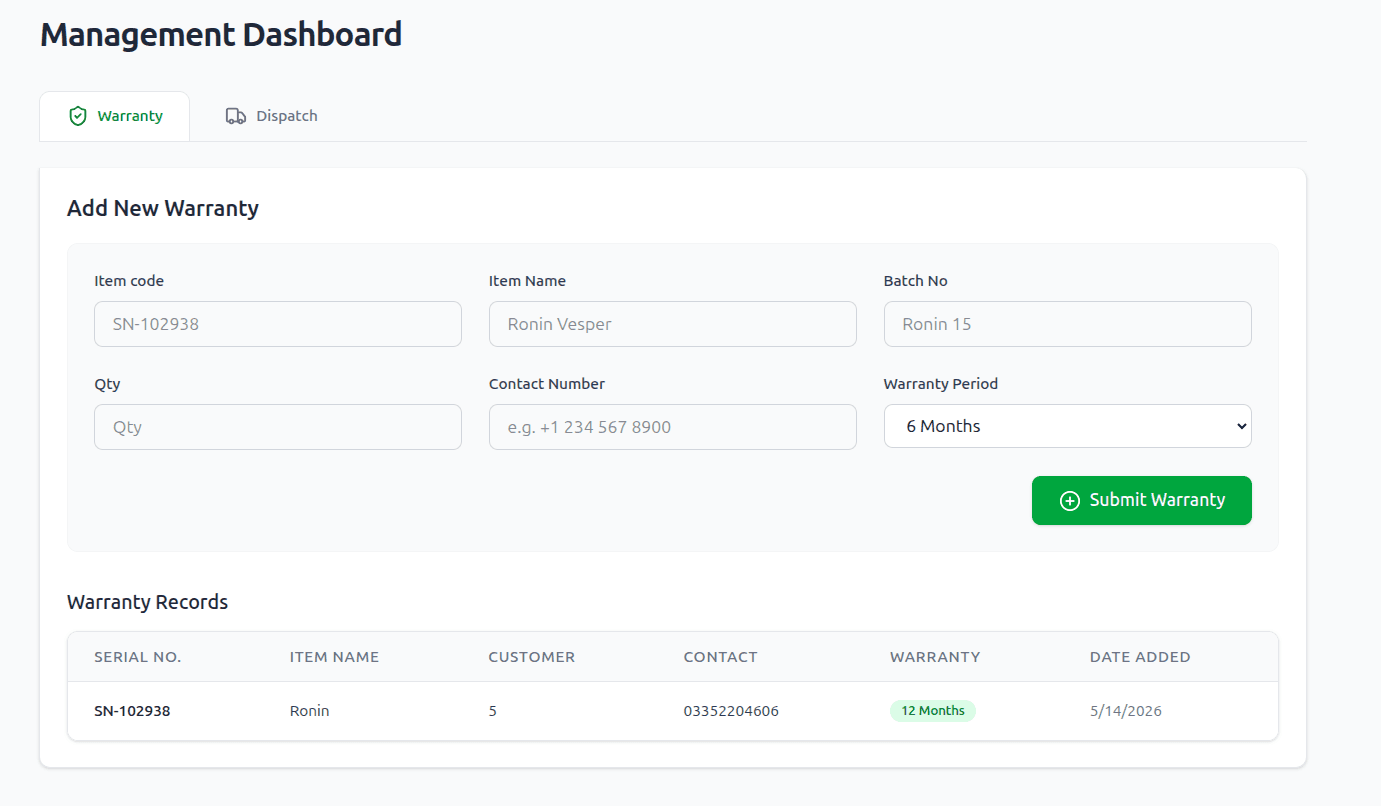
Ronin E-Warranty System & Management Dashboard
A warranty provider handled claims and verification manually, with no way to monitor agent performance or let customers track their own warranty requests once submitted.
Where these storefronts run
Same platform, different catalogue rules
The build pattern is consistent. What changes is how the catalogue is structured and what happens after the order.

Fashion & apparel
Size and colour variants, seasonal collections, lookbooks, and a returns rate that makes the post-purchase flow as important as the product page.
- Size, colour, and fit variants
- Seasonal collections and lookbooks
- Returns and exchange workflows
- Editorial and campaign pages
How commerce builds run
Model the catalogue before you design the page
Getting the content model right first is what stops the third month turning into a rewrite.
Catalogue & content audit
We go through what you sell, how it varies, how it is priced, and how your team currently edits it. This is where the awkward cases surface — bundles, made-to-order, regional stock.
Deliverables
- Catalogue inventory
- Variant and pricing rules
- Editor workflow notes
Content model & spec
Schemas for products, collections, and editorial content, plus the page templates and the block library editors will compose from. Signed off before design starts.
Deliverables
- CMS schema
- Block library
- Template spec
Design system
Tokens, components, and the key templates — home, listing, product, cart, checkout — designed against the real catalogue rather than filler content.
Deliverables
- Design tokens
- Component library
- Key templates
Storefront build
Templates built server-first with caching per route, wired to the CMS and commerce provider, reviewed on a preview URL as each template lands.
Deliverables
- Live preview URL
- Template walkthroughs
- Caching plan
Checkout & integrations
Payments, tax, shipping, and the back-office sync, tested against real failure cases: declines, stock races, partial fulfilment, and refunds.
Deliverables
- Checkout test matrix
- ERP sync
- Refund and returns flows
Content migration & training
Existing content and products migrated with redirects mapped, then a working session so your team can publish confidently on day one.
Deliverables
- Migration report
- Redirect map
- Editor training
Launch & optimise
Cutover with monitoring, then a tuning window on search, merchandising, and page performance using real traffic.
Deliverables
- Launch checklist
- Vitals report
- Search tuning notes
Why work with me
A storefront your team owns after launch
The success condition is not launch day. It is whether your marketing team can run a campaign in March without calling anyone.
The content model comes first
Design follows the schema, not the other way round. That is what stops the workaround pile from becoming the architecture.
Failure states are designed
Declines, stock races, and expired sessions get real screens. Most abandoned carts are a UX gap, not a pricing problem.
Editors are the primary users
If your team cannot build a landing page alone, the CMS is not finished, regardless of how good the developer API is.
Measured, not assumed
Funnel events, search queries, and vitals are instrumented from launch, so optimisation is based on your data rather than best practice articles.
12+
Projects shipped end to end
3+
Years building commerce and content
0
Deploys to publish content
100%
Builds handed over documented
Frequently asked
Questions people ask before we start
Outgrown your current storefront?
Tell me what you sell and where the current setup gets in the way. You will get an honest read on whether replatforming is worth it, and what it would take.